Archive for the ‘Mac'd Rides’ Category

Mac’d Ride: Mercedes CLS with iMac Integrated in the Back Seats

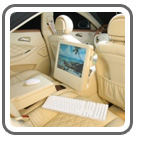
German car customizer, Mattes Interieurtechnik, has created a customized Mercedes CLS with a nicely integrated iMac personal computer in the rear seats.

The iMac’s compact all-in-one design lends itself to such an installation, and the firm makes sure the integration is complete with slick leather covering around the machine.

A wireless mouse and keyboard mean there are no exposed wires to contend with. Of course, the customized CLS also gets a completely revised interior, with some pretty fancy upholstery and trimmings.

To see more, click here!

Mac’d Ride: 2005 Mazda 3

Matt Burriola installed a Mac mini into his 2005 Mazda 3 sedan and documented the entire installation process. His goal for his project was to create a system with better than stock sound and capability, while maintaining a clean, stock appearance.
Despite not using an Apple since high school, Matt was inspired while doing other mods to the car (adding window tint and an alarm), and decided to go for it.

First, Matt took apart his cupholder assembly, cigarette lighter panel, and the center console. Once in there, he thought that the Mac mini was too big too fit in there without a bunch of hacks, and decided on a glove box install instead.

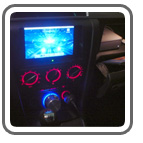
Next, he removed the stock radio and was left with a vast space, which is where he installed a 7″ Xenarc 700TSV touch screen. It also provided ample space behind the screen to stash the CarNetix P1900 power supply.

Matt highly recommends a wiring harness if you plan to completely remove your stock head unit from your Mazda 3. He used a Metra 70-7903 harness to make speaker connections on the pigtails. That way if you ever need to go back and use the stock radio, you just unplug this harness and replace your old stereo. He used the power feed from the Metra harness to feed the valet switch, which controls the sleep mode of the CarNetix P1900.

He used a 3-position switch to provide greater control over the sleep state of the CarNetix P1900 and Mac mini. As installed, if the switch is in the middle position, then the center wire stays at 0 volts and tells the P1900 to sleep the Mac. In the downwards position, the car’s ignition state will control the Mac’s sleep state. In the upwards position, the P1900 is getting constant 12v on the ignition wire (regardless of actual ignition state) so you can run the computer even with the car off. Matt does this when he wants to sync his iTunes over the wireless network.

Since he completely removed the stock head unit, he needed a way to get radio back into the system. Using a Griffin Radio Shark, he re-cased the guts into a small project box, de-soldered the original copper FM antenna wire, and soldered a short wire to the positive contact on a Motorola socket. Now the stock radio antenna can plug right in, it provides greatly improved FM reception.

A Griffin PowerMate controls volume for the entire system and casts a cool-looking blue glow that contrasts nicely with the red glow of the stock Mazda 3 controls.

Specs

If anyone is looking to install a Mac mini in their Mazda 3, head on over to Matt’s site to see more pictures and learn exactly how to do it. Nice job Matt!

Discuss this story

Mac’d Ride: 2006 BMW 325

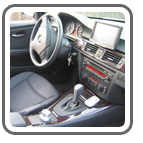
Check out this sweet Mac mini install inside a 2006 BMW 325. Hal Fitzgerald spent four months hunting for the right installer to complete his project and the results are impressive.
All the computer hardware including the Mac mini CPU, a Newertech MiniStack 250GB drive with USB and Firewire hub, and a Carnetix P1900 power supply are mounted in the trunk where the CD changer would normally go. The audio is fed out of the Mac mini right into the factory 1/8″ changer input. Hal had a custom mount built to support the 7″ Lilliput touchscreen.

“I couldn’t find anything that was going to let me mount the screen exactly where I needed. With the custom mount, it’s now low enough on the dash so I can still see my dashboard and windshiled completely. I wanted the install to be minimally intrusive to the aesthetics of the car and also wanted to be able to return the car to its original state very easily. There is only one small hole in the front dash panel behind the screen. The center console piece just popped out and we fabricated a decent looking piece of plastic to fit into its place.”

A Keyspan Express Remote controls the system (and was purchased on ebay for $5!). Hal ripped the electronics out of the IR receiver and mounted it under the AC/stereo unit where it is almost invisible.

Apple’s Front Row and iTunes are running on the Mac mini for video and audio playback. A Sony Ericsson s710 bluetooth cell phone uses Apple’s Address Book to display the caller ID on the screen when a call comes in. You can simply answer or ignore the call via the touchscreen - no more looking down at the phone.

Hal’s next step is to add GPS and maybe a Griffin Radio Shark for FM radio reception.


Click here to view larger photos of this install.

Discuss this story

iTripping With A Mac mini

Joshua Driggs, aka ZapWizard has a great Flickr photo set that shows how he installed a Mac mini along with a Griffin iTrip into his Mazda.

He was taking a 4,000 mile trip and wanted to Mac his ride - and he did it in 3 days! He explained that he didn’t have the cash or the time to replace his head unit, so he integrated an iTrip FM transmitter directly into the Mini.

To install the Mac mini he removed the center console and cut away the front to get the mini to fit properly. ZapWizard also made his own right-angle jack (using hot glue) and a DVI to VGA adapter by pinning out, taking apart, and re-wiring an existing one. He wanted to have a remote power button, so he installed a small jack in place of the security cable. To wire the iTrip, he used +5volts from an old cell-phone charger and a dummy headphone jack to turn it on.

A USB hub, which is installed beneath the mini, powers the keyboard and mouse receiver, GPS puck, and cell phone via USB. The Gyration mouse is charged via another hacked up Cell phone charger (+9volts) and on the one extra port, he’ll use a Secure Digital card reader.

He uses an inverter and the stock apple power supply. Everything is wired to a switched power block, and then to the always on +12volts that is shared with the car radio. He also has a 12volt lead acid battery that he can jack in to allow for power while starting the car or for independent power.

Currently, the bulk of the wiring sits under the passenger seat, but will be hardwired in time. Everything is held down by Velcro and all the cables are routed through the center console.

As the install progressed, he did get his head unit installed and running, and hung an LCD off a holder that he used for his iPod. But, he cautions that it is NOT the final install (as he’ll ditch his FM Modulator).

ZapWizard’s latest Mac mini projects include the creation of a script to get NMEA GPS data into Google Earth and is also collaborating to get a good front-end working.

Discuss this story

Mac’d Ride: 1994 Chevrolet 4×4 S-10 Blazer

With over 12,000 songs and over 200 music videos in iTunes, Zach Ducker’s 1994 Chevrolet 4×4 S-10 4 door “Blazer Beast” is a Mac’d entertainment machine.

He removed the original center console and fabricated a custom one with plywood and covered it in funky pink shag. The new console houses the Mac mini, CarNetix power supply, Pyle video amplifier/distributor, 800W AC inverter with two 110V AC outlets, USB 2.0 hub, and four 12V outlets.

Taking out the Mac mini, which is held tightly in home-made brackets, is very simple and quick: just open up the console lid, unplug the cables, and pull it out. The touch-screen is mounted at the end of the center console, and it can swivel and rotate to adjust it when it’s sunny out.

Audio is run via a Monster cable 3.5mm to RCA converter and video is run from the Pyle amplifier/distributor. The Pyle video amplifier/distributor receives input from the Apple DVI-composite video adapter, and then feeds video to the 10.2 Xenarc touch screen, the screen on the Dual XDV8125 deck and a 7″ Pyle screen. The Dual deck brings the whole install together, as it acts a receiver since it has audio and video inputs and a 2.5″ screen. The deck puts 60W to each of the four Infinity reference series mid range with tweeters speakers, with two 4″x6″ in the dash and two 6″ in the rear doors. A 15″ subwoofer, powered by a 300W amp, complements the lower frequencies.

A CarNetix P1990 powers the 18V to the Mac mini, the 12V to the Xenarc touch-screen, and the 5V to the USB 2.0 hub. He upgraded the electrical system with a 200 amp alternator, replacing 105 amp original, and put in an Optima red top battery. A 1/0 gauge power cable runs into the cab and goes into a fused distribution box to power all the accessories that are in the vehicle’s interior.

The only problem he encountered was excessive heat build up in the center console, because the Mac mini, CarNetix power supply, Pyle video amplifier/distributor and 800W AC inverter are in there, so he installed a fan in the rear of the center console to help circulate the air. The fan, which has blue LEDs on it, is pretty cool at night.

Also since this is an active 4×4, he installed a Warn winch and brush-guard on the front. Although he turns off the Mac mini in extreme off-road conditions so that the vibrations do not jar the hard disk and ruin it.

He chose the pink carpeting for the front doors and center console since it was the one fabric that stood out most to him. He says, “It is so soft and supple, you might end up ‘petting’ the Blazer”. We think it’s a pretty darn sweet ride - great job Zach and friends!

Specs

  • Auto: 1994 Chevrolet 4×4 S-10 4 door Blazer
  • Mac mini configuration: 1.42 GHz, 80GB hard drive, 1GB SDRAM, AirPort Extreme and Bluetooth
  • Display: 10.2″ Xenarc 1020TSV touch screen, 7″ Pyle screen
  • Input devices: Cirque track-pad, Apple keyboard (USB for now, getting a bluetooth soon)
  • Software: Roadnav and MacGPSPro for navigation purposes and will be running Garmin apps once they are OS X capable

The Links

Here are links to the info and photos of the installation of the Mac mini that Zach and his friends put into his Chevy S-10 Blazer.

Discuss this story

Mac’d Ride: Jeepintosh - 2005 Jeep Grand Cherokee

Check out this sweet Mac mini install in a 2005 Jeep Grand Cherokee. The mini is installed in the glove box and snugly held in place with a soft, but rugged carpet-covered custom bracket. A hub is mounted behind the CPU and USB and Firewire cables run to the back of the Jeep to easily add peripherals to this system. The 7″ Xenarc 700 TSV display has replaced the original stereo in the center console. Grey vinyl was used to match the display surround to the factory grey interior. Below the heat/air controls is a small Kensington USB hub with a Griffin PowerMate connected to it to control iTunes. A Palm Treo 650 provides Internet access and Salling Clicker is also used to wirelessly control the system. A rear-view Pioneer ND-BC1 camera is mounted on the rear of the Jeep near the license plate and piped to the Xenarc display to easily see what’s behind you.

This Mac’d ride also includes an awesome custom box, built by Elroy from Car Toys that houses a pair of JLAudio 10W3s speakers, two JL Audio 500/1 and 300/4 amps, and an auxiliary Optima battery that powers the entire system. The custom box is covered with a special ordered vinyl to match the color of the interior leather and is even emblazoned with the Apple logo - nice touch!

Specs

  • Auto: 2005 Jeep Grand Cherokee
  • Mac mini configuration: 1.5 GHz, 80GB hard drive, 512MB SDRAM, Superdrive, AirPort Extreme and Bluetooth
  • Display: 7″ Xenarc 700 TSV
  • Input devices: Griffin PowerMate, Griffin RadioShark, Palm Treo 650 for media control and online access via bluetooth, BU-353 USB GPS receiver, Logitech bluetooth mouse and Apple bluetooth keyboard
  • Software: Front Row, Route 66 for mapping trips. Salling Clicker (to control system via Treo 650)
  • Audio and Powering: a pair of JLAudio 10W3s speakers, JL Audio 500/1 and 300/4 amps, CarNetix CNX-P1900, Optima battery and PAC 200 battery isolator

Check out more pictures of this amazing install here.

Discuss this story

Mac’d Ride: 2006 Infiniti M45

Here’s another slick install that features Apple’s Front Row and a concealed Mac mini driving the show. Brooks Weisblat Mac’d out his new 2006 Infiniti M45 Sport with a Mac mini stashed in the center console. The “Tech” package on the M45 comes with an auxiliary RCA input for audio/video hookup, so Brooks simply jacked the Mac mini’s video through the two factory 8″ displays - sweet! A Kensington bluetooth mouse with VirtualKeyboard X, and a Palm Treo 650 running Salling Clicker provide input and control for the entire system. The Mac mini’s built-in AirPort WiFi connection is used for wireless web access. When Brooks is not in rage of a WiFi connection the Treo 650’s bluetooth dial-up connection and Sprint’s PCS Vision keep him connected.

Specs

  • Auto: 2006 Infiniti M45 Sport with Tech/Journey/MES Packages
  • Mac mini configuration: 1.42 GHz, 80GB hard drive, 512MB SDRAM, Combo Drive, AirPort Extreme and Bluetooth
  • Display: Two factory 8″ displays connected via an Apple DVI to Composite/S-Video Adapter
  • Input devices: Kensington bluetooth mouse, Palm Treo 650 for media control and online access via bluetooth and Sprint PCS Vision Dial-up
  • Software: Front Row, VirtualKeyboard X 2.4.5 (to enter text using the mouse - no hardware keyboard needed) and Salling Clicker (to control Apple Front Row via Treo 650)
  • Audio and Powering: Factory stereo using Griffin iMic to feed audio out of the Mac mini. Powered through a mini 95w power inverter (soon to be replaced with a CarNetix CNX-P1900)

Make sure to check out more pictures of this install over at DragTimes.com.

Discuss this story

Hacked Audi A6 Navigation Display

Thanks to a nice Audi technician, a new Audi A6 owner was able to hook the video output of his Powerbook directly into the factory in-dash navigation system. His next step… replace the Powerbook with a Mac mini - way to go!

You can read more here.

Mac’d Ride: Ford F-150

We are a little late on this covert install, but better late then never…

Davy Arroyo, has Mac’d out his Ford F-150 with a Mac mini setup and a big 10.2″ Dynamix touch-screen. The goal of Davy’s install was to make the installation look as stock as possible. The Mac mini hides and shows itself as needed, thanks to a hidden actuator in the armrest compartment - very cool! The 10.2″ Dynamix touch-screen folds closed for a very inconspicuous install. Apple’s Front Row is controlling all media and GPS is handled by Route 66.

Specs

  • Auto: 2005 Ford F-150
  • Mac mini configuration: 1.25 GHz, 40GB hard drive, 512MB SDRAM, Combo Drive, AirPort Extreme and Bluetooth
  • Display: Dynamix 10.2 Touch Screen
  • Input devices: Bluetooth Apple Mouse and Bluetooth Apple Keyboard, BU-353 GPS Receiver, Keyspan IR Remote
  • Software: Front Row and Route 66 (GPS)
  • Audio and Powering: P.I.E. FRD04- AUX converter (converts the AUX port from the stock radio to RCA inputs), CarNetix CNX-P1900

There’s a thread with additional pics of this sweet install over at mp3car.com. Check it out.

Thanks to CarHacks for kicking our butt back into gear and finally getting a new Mac’d ride posted on MacVroom - more to come real soon!

Discuss this story

Mac’d Ride: 2004 Cadillac Escalade “BabyPhat” DJ

We found an amazing new Mac’d ride we wanted to share with you - Sharon’s totally customized 2004 Cadillac Escalade. It’s affectionately called “Baby Phat” because the interior was pieced together with over 40 carefully stitched together Baby Phat handbags.

What makes this car especially sweet is the Mac mini powered DJ Console and 30″ BenQ LCD display in the tailgate. DJs can crank out the tunes with its ginormous audio system, but they can also mix, scratch, and cut with MP3s (stored on the Mac mini’s hard drive). The mini also plays DVDs, powers iTunes, and runs iPhoto slideshows of the Escalade being built. Other fun stuff inside includes televisions mounted in the headrests, three 15″ Audiobahn Eternal subwoofers, and an Xbox.

The construction of this cool ride took approximately six months and it’s already getting some great recognition - this summer, Sharon entered it in five shows and took home 11 trophies in various categories.

You can check out additional photos, including construction shots here.

Discuss this story